Alone
Each circle is one trigger and one channel of OUT. Shift-drag up or down on the screen to add or remove triggers. With a single trigger left, the whole black area is its button, not only the circle drawn at its top.


- Pulse the small mark at the top left: pulse mode on or off
- Triggers click to fire or light; drag across for several
- Shift-drag up adds triggers, down removes them: one to sixteen, eight to start
- IN a poly cable, one channel per trigger
- OUT the triggers, one channel per trigger
Pulse mode is on to start: its mark at the top left of the screen is lit, and a click on a circle fires one trigger, 10 V for 1 ms, on that channel of OUT. With pulse mode off (its mark dark), each circle is a toggle: a click lights it and its channel stays at 10 V until clicked again. There is no momentary mode, where a trigger stays high while held. Turning pulse mode on clears the lit triggers.


A poly cable into IN takes over the triggers, one channel per trigger, and a click does nothing while it is in. In pulse mode, IN turns gates into triggers, one as each gate rises; with pulse mode off, the gates pass through. Pull the cable and the pattern you set comes back.
Bonded
In a rig, a TRG that a SEQ steps through has toggles only: the pulse mark is gone, lit triggers turn white, and yellow marks the playhead. Its own OUT gives the lit triggers as steady gates, a channel each, whatever the SEQ is doing. A TRG that no SEQ steps keeps its pulse mark and works as it does alone; the factory rig Detailed Envelope has one at its left as a button, cabled into the CLK's RESET.
A trigger sequencer
To the left of a SEQ, each trigger of a TRG is a step. The SEQ's OUT, labelled TRIG, fires a 1 ms trigger as the playhead lands on a lit one. To build a five-step pattern, Shift-drag the TRG down to five triggers and click the steps you want to hear.
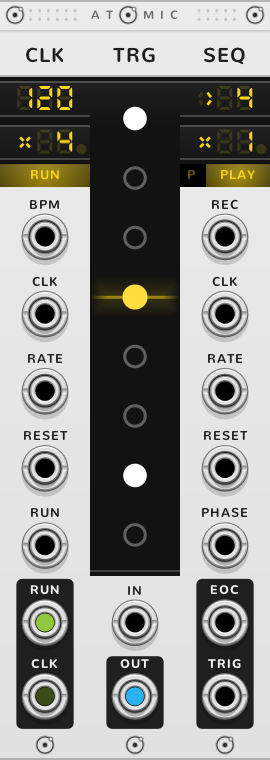
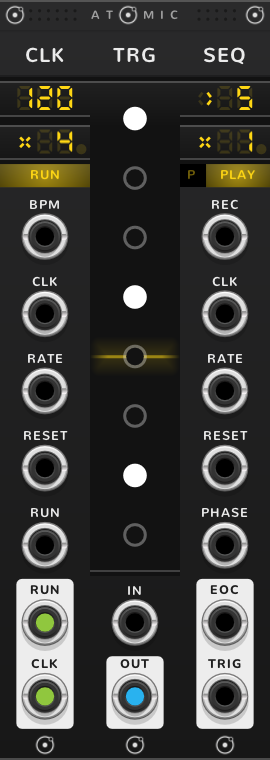
The SEQ's TRIG gives triggers only, never gates; for a gate as long as a step, let the SEQ step CV faders set to 0 V and 10 V instead. The SEQ guide shows how to give a melody its gates.
For two patterns of different lengths on one clock, bond a CLK, a TRG of five, a SEQ, a TRG of seven and a second SEQ: each SEQ steps the TRG nearest its left, and the two drift against each other, meeting again every 35 steps.
Poly steps: drum tracks
Turn on the SEQ's poly steps, the small P square left of its mode button, and each TRG becomes one step; its lit triggers come out together on the SEQ's OUT, labelled POLY, one channel per trigger: up to sixteen drum tracks at once.
For a drum pattern, bond four TRGs of three triggers each to the left of the SEQ, with poly steps on. In each TRG, light the first trigger for a kick on that step, the second for a snare, the third for a hat, and split the SEQ's OUT with any split module into three cables, one per drum.
OUT carries a channel per trigger of the TRG playing; with poly steps on, Shift-drag over any TRG sizes them all together.
More ways to drive it
Fed by a POLY
A POLY with a cable in its IN splits that cable onto the TRGs to its right, one channel per trigger. A trigger you click then stops following the POLY until you double-click it.
Cables on the triggers
Every trigger is a jack too, an input and an output at once. ⌘*-drag from a circle to patch a cable out of that trigger. Drop a cable from an output onto a circle and it drives that trigger; drop one from an input and the trigger feeds it.
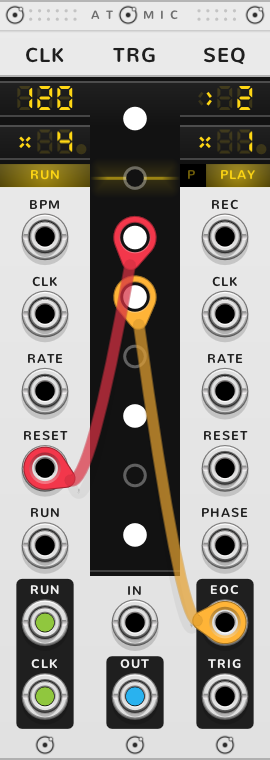
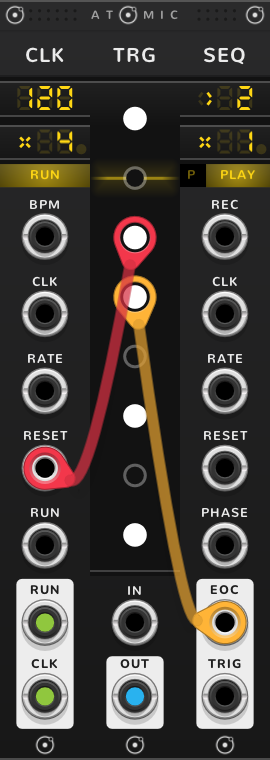
A cable into a trigger works it at each pulse, as a click does. Bonded to a SEQ, a cable out of a trigger fires each time the playhead reaches it, lit or not: a trigger can reset a CLK or a SEQ at a chosen step. With poly steps on, it fires only when its TRG plays with it lit.
The reset comes with the tick that brought the playhead there, so the step it fires on is not heard: step one plays in its place. A cable from the third trigger into the CLK's RESET loops two steps, the CLK and every SEQ on it starting again together; one from the sixth into the SEQ's RESET loops five. A cable from the SEQ's EOC into a trigger toggles it at the start of every pass.
Shortcuts
| Where | Gesture | What it does |
|---|---|---|
| Triggers | Drag across | light or clear the triggers (in pulse mode: fire them) |
| Triggers | Shift-drag | add or remove triggers |
| Triggers | Shift+⌘-click | invert all the triggers |
| A trigger | ⌘-drag | patch a cable from this trigger |
| A trigger | Drop a cable | patch this trigger |
| A trigger | Right-click | its cables |
| Triggers, poly steps | Shift-drag | size all the SEQ's TRGs |
| A trigger set by hand while a POLY feeds it | Double-click | follow the POLY again |
| Pulse | Click | pulse mode on or off; on clears the pattern |
On every module
| Where | Gesture | What it does |
|---|---|---|
| A value on a screen | Double-click | back to its default |
| Any part | Rest the pointer | a tooltip explains it |
| A module's title | Hold ⌘ or Alt | the Atomic menu: change this module into another kind, or insert one beside it |
| The Atomic menu | Add Shift, click DELETE on its top line | delete the module |
| The bracket | Delete | remove the whole rig |
| The bracket | ⌘-D or Alt-D | duplicate the rig; with Shift, its cables too |
| ATOMIC on the bracket | Click | it reads RESET under the pointer, and starts every SEQ and CLK of the rig again |
* ⌘ is Ctrl on Windows and Linux.