Two variants
The arrows beside the title switch the CLK between BPM and Hz. They appear while the pointer is over the title.




Alone, in BPM


- ◂ ▸ BPM or Hz
- Tempo 1 to 4095 BPM; 120 to start
- Rate ticks per beat, from /255 to x255; x4 to start, so ticks fall on sixteenths
- Pie click to free the rate from whole steps
- RUN start and pause
- BPM +1 V doubles the tempo, -1 V halves it
- CLK follow an external clock
- RATE +1 V doubles the rate, -1 V halves it
- RESET restart the beat, and the SEQs it drives
- RUN a gate: high runs, low stops
- RUN out high while it runs
- CLK out the ticks, 0 V or 10 V, high for the first half of each
Each tick is one step of a SEQ the CLK drives. The rate starts at x4, so at a tempo of 90 BPM a SEQ at x1 plays sixteenths, four steps a beat: for a step a beat, set the CLK's rate to x1, and for eighths, x2. A trigger at CLK or RESET is a rise past 1 V.
RUN pauses: pressed again, the CLK goes on from where it stood, and so does every SEQ it drives. To start from step one, reset first (see Reset).
Following an external clock
Patch one trigger per beat into CLK and the CLK follows that tempo, its ticks in time with the triggers. RUN still starts and stops it, and the tempo stays when the cable is pulled. PPQ, pulses per quarter note, in the module's menu, is 1 to start; if the source sends 4 or 24 pulses per beat, set it to match. With PPQ at 4 or 24, CLK out sends that many pulses a beat at the tempo, whatever the rate, whether the CLK follows a cable or keeps its own tempo; the rate still sets the ticks that step the SEQs.
Whole and free rate
A whole rate moves only in steps, x2, x3, /2 and so on, and a change waits for the next beat, so whatever is clocked stays on the grid. A voltage at the RATE jack snaps to the nearest step too.
Click the pie at the right of the rate to free it. A free rate takes any value, such as x3.11, and a change is heard at once. The pie shows the part past the whole number: x2.5 reads x2 with half the pie lit. On a free rate the RATE jack sweeps smoothly, and its label changes to FM.


Bonded
In a rig, bond a CLK anywhere to the left of the SEQs it should drive, and no cable is needed. Every SEQ to its right runs on it, each at its own rate. A second CLK further right takes over for the SEQs past it.
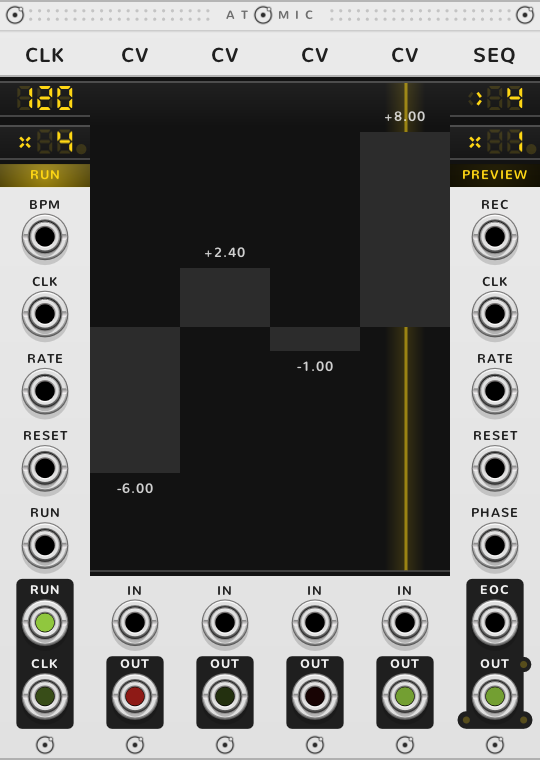
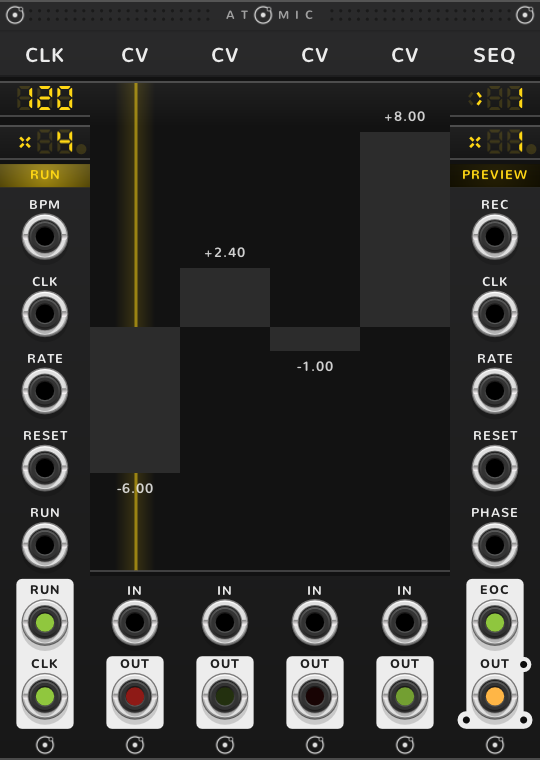
A SEQ with a cable in its own CLK input follows that cable and ignores the CLK. To follow an outside clock with the whole rig, patch it into the CLK's CLK input.
Reset
A trigger at RESET restarts the beat, and every SEQ to the CLK's right, up to the next CLK, goes back to its first step with it. Running on its own tempo, the CLK ticks at once, so step one plays at once. Following a cable, it waits and the next trigger in CLK is the first beat. Stopped, it stays stopped and waits for RUN, which starts with a tick on step one; this is so for the bracket's RESET too, which puts a stopped rig back to the start without setting it running. A SEQ in ONCE whose pass has finished starts again only from a reset, never from RUN alone. A trigger at CLK and a trigger at RESET on the same sample count as one restart, with that trigger as the first beat, so a bar trigger sent with the clock resets cleanly.
A second CLK with its own RESET empty resets with the CLK to its left, so one cable restarts the whole rig. To restart one SEQ alone, use the SEQ's own RESET.
In Hz
The frequency runs from 0.01 Hz to 20 kHz and starts at middle C, 261.6 Hz. The rate starts at x1 and counts ticks per cycle, so at x1 CLK out is a square wave at the frequency on the screen, 0 V to 10 V, and at x4 a square two octaves higher. RUN still starts and stops it. Some jacks change their job in Hz:
| In BPM | In Hz | What it does in Hz |
|---|---|---|
| BPM | V/OCT | +1 V raises the frequency an octave; at the default frequency, +0.75 V gives A4, 440 Hz. |
| RUN in | PHASE | Shifts the cycle: +10 V one whole cycle ahead, +5 V half a cycle, negative volts back. While the CLK is stopped, a ramp here drives the cycle on its own. |
| RUN out | PHASE out | A ramp rising from 0 V to 10 V once a cycle. |
| RESET | RESET | Restarts the cycle at once, as a hard sync. |
| CLK | CLK | Nothing. |
For audio, turn on BLEP, band-limited steps, in the module's menu: it smooths the jumps in CLK out and PHASE out so they don't alias. Leave it off for clocks and logic, where the edges should land exactly on a sample.
A CLK in Hz drives bonded SEQs a step per tick, so a SEQ at audio rate is an oscillator; with the CLK's rate set to the number of steps, one pass is one cycle. Bond a CLK at 110 Hz, rate x4, four CV faders and a SEQ, and OUT is a 110 Hz tone shaped by the faders. The SEQ's own lights against aliasing are in the SEQ guide.
Shortcuts
| Where | Gesture | What it does |
|---|---|---|
| Tempo | Drag | the tempo |
| Tempo | Shift-drag | tempo by tens |
| Frequency (Hz) | Drag | the frequency |
| Frequency (Hz) | Shift-drag | frequency by octaves |
| Frequency (Hz) | ⌘*-drag | frequency by cents |
| Rate | Drag | the rate |
| Rate | Click the pie | whole or free rate |
| Rate | Drag the pie | between whole rates |
| Rate | Shift-drag | rate by octaves |
| Rate | ⌘-drag | fine |
| Rate | Shift+⌘-drag | finer |
| RUN | Click | start or pause |
| Title | Click an arrow | the other variant |
On every module
| Where | Gesture | What it does |
|---|---|---|
| A value on a screen | Double-click | back to its default |
| Any part | Rest the pointer | a tooltip explains it |
| A module's title | Hold ⌘ or Alt | the Atomic menu: change this module into another kind, or insert one beside it |
| The Atomic menu | Add Shift, click DELETE on its top line | delete the module |
| The bracket | Delete | remove the whole rig |
| The bracket | ⌘-D or Alt-D | duplicate the rig; with Shift, its cables too |
| ATOMIC on the bracket | Click | it reads RESET under the pointer, and starts every SEQ and CLK of the rig again |
* ⌘ is Ctrl on Windows and Linux.